Useful Open Source Software: FreeMind
update 6/11/2024: this is a post from a blog that I contributed to in 2011 called TechHacking, it shut down eventually but I was happy to be able to find some of my work through the internet archive.
Freemind is a free mind mapping program which has some amazing functionality and a variety of uses. A mind map is nothing more than what people have done for years with a pencil and pad of paper – Brain Storm. You start with a main idea, then you expand it with branches of related concepts, then you expand those concepts with specific details. Before you know it, you have just cured cancer, invented the first car that runs on water, or successfully taken over the world.
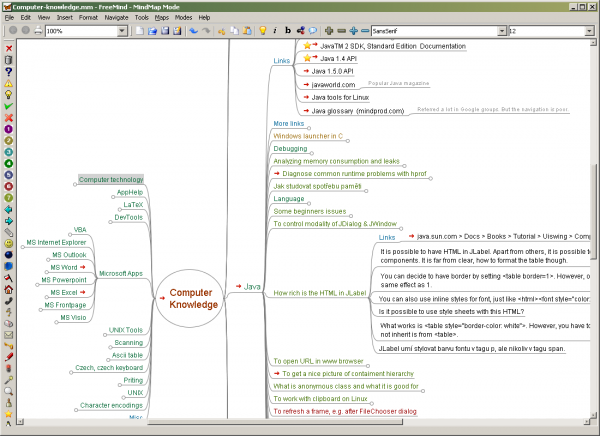
https://freemind.sourceforge.io/wiki/index.php/Main_Page
The best part about Freemind, is that unlike a pad and paper you are able to insert images, objects, links, files, and pretty much anything that you desire into your mind map which allows you to have one place to organize all of your thoughts. Mind maps are an alternative way to study, take notes, organize your ideas, make decisions, and solve problems. I have been using it for about a year in school. Personally, I am in love with it. I used to take vigorous notes in classic format. But I found myself getting lost, confused, and unable to really feel a sense of organization in my notes. Freemind allows you to have all of your information on a single page. You can expand and reduce the categories as you see fit to first learn major concepts, and then specific details.
FreeMind has a slight learning curve, but it is not too difficult. It’s more sophisticated than just making lists and drawing arrows, and once you get the hang of it – you will be mapping all of your thoughts in no time. The possibilities for uses of Freemind are endless, some have even called it their “second brain.” This program is currently available for Mac, Windows, and Linux. If you are searching for a way to organize your thoughts in one place, try a new approach on note taking, or develop a new idea, then your search should end here. I am currently using FreeMind to plan out the rest of my life. Download it today!
Thank you for reading! Share your thoughts with me on bluesky, mastodon, or via email.
Check out some more stuff to read down below.
Most popular posts this month
- SQLite DB Migrations with PRAGMA user_version
- Microblog
- How to Disable Wayland in Debian Testing
- Setting up ANTLR4 on Windows
- 北京
Recent Favorite Blog Posts
This is a collection of the last 8 posts that I bookmarked.
- The contagion of fear from The Observation Deck
- The revolt of the reader from The Observation Deck
- Deeper dive: Were Touch Bar’s problems software rather than hardware? from Unsung
- Joining Cursor from Fatih Arslan
- Pluralistic: Digital sewer socialism (08 Aug 2026) from Pluralistic: Daily links from Cory Doctorow
- Pluralistic: Enshittification and Reverse Centaurs go global (29 Jul 2026) from Pluralistic: Daily links from Cory Doctorow
- AI Mania Is Eviscerating Global Decision-Making from Ludicity
- The default person from https://popagandhi.com/
Articles from blogs I follow around the net
Before pixels: Speed-Minder
As you could probably tell, I was driving a bit recently, and once in a while saw this kind of a sign, often equipped with a (beloved) segmented font, reporting your current speed as detected by radar: Just today, I learned of an early version of this idea...
via Unsung October 21, 2026[RODEN] Digger Is Good, Notebooks, Please Be Weirder
Roden Readers — Hello from the other side of hiding in Europe during Japan’s extended summer / record-breakingly rainy September. It is I, Modo-san. I was working on a book in London. And then co-leading a Walk and Talk in Norway. And then participating in...
via Craig Mod — Writer + Photographer October 21, 2026Jesus Christ patch your shit now
In the hours following the release of CVE-2026-109618 for the project PHP, site reliability workers and systems administrators scrambled to desperately rebuild and patch all their systems to fix multiple memory safety vulnerabilities that allow attackers t...
via Xe Iaso's blog October 21, 2026Generated by openring