Useful Open Source Software: Inkscape
update 6/11/2024: this is a post from a blog that I contributed to in 2011 called TechHacking, it shut down eventually but I was happy to be able to find some of my work through the internet archive.
Inkscape is a free and open source Scalable Vector Graphics (SVG) Editor. It it similar to Adobe Illustrator. While it lacks some of the more advanced features of proprietary SVG editors, it still has stunning capabilities allowing you to make brilliant drawings and graphics.
Vector Graphics are basically resolution-independent graphics, in comparison to bitmap graphics which are always bound to their pixels, vector graphics are stored through a mathematical formula in lines, shapes, and colors allowing them to become virtually any size without losing their quality – hence the term scalable (in SVG). Vector graphics can be very useful when developing logos and banners for your website.
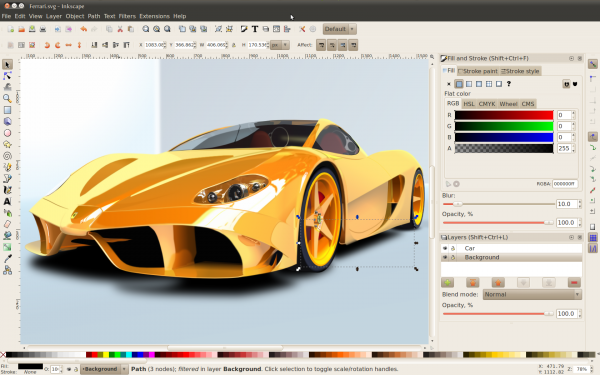
Inkscape has recently released a new version (0.48.1) which will be available for download soon. Some new features in version .48 include:
- An improved text tool which allows you to add subscript, superscript, spacing, rotation and more
- Ability to edit multiple paths
- A spray tool (which is demonstrated in the picture above)
- Takes advantage of multi-threading for the Gaussian Blur filter
The new features in 0.48.1 build upon the already wonderful program. As this program continues to be developed in an open source environment, it will be exciting to see its growth. In addition to GIMP and several other graphic design programs (to be covered soon), Inkscape adds a significant piece of software to open source graphical editing capabilities allowing you to create professional graphics without spending any money on software or licenses.
Inkscape is available for download for Mac OSX, Windows, and Linux. If you do any sort of graphic design or have been wanting to try out working with vector graphics, download it today and you will not be disappointed. If you are new to SVG, there are tons of awesome tutorials and guides available to help you get started.
Thank you for reading! Share your thoughts with me on bluesky, mastodon, or via email.
Check out some more stuff to read down below.
Most popular posts this month
- Microblog
- SQLite DB Migrations with PRAGMA user_version
- Setting up ANTLR4 on Windows
- Converting CSV to a SQLite Database
- How to Disable Wayland in Debian Testing
Recent Favorite Blog Posts
This is a collection of the last 8 posts that I bookmarked.
- The contagion of fear from The Observation Deck
- The revolt of the reader from The Observation Deck
- Deeper dive: Were Touch Bar’s problems software rather than hardware? from Unsung
- Joining Cursor from Fatih Arslan
- Pluralistic: Digital sewer socialism (08 Aug 2026) from Pluralistic: Daily links from Cory Doctorow
- Pluralistic: Enshittification and Reverse Centaurs go global (29 Jul 2026) from Pluralistic: Daily links from Cory Doctorow
- AI Mania Is Eviscerating Global Decision-Making from Ludicity
- The default person from https://popagandhi.com/
Articles from blogs I follow around the net
Issue 111 – Back the winners
A Trump crypto adviser’s firm took millions from Tether while he shaped stablecoin rules in their favor, a Senate probe targets Commerce Secretary Lutnick’s not-so-former firm, and crypto’s biggest super PAC plays it safe
via Citation Needed October 16, 2026Pluralistic: Load-bearing (16 Oct 2026)
Today's links Load-bearing: Digital sovereignty vs AI. Hey look at this: Delights to delectate. Object permanence: Anthrax penmanship; Stolen WEBGEEK license plate; Arizona Republic endorses Clinton, gets death threats; Against the great forces of history....
via Pluralistic: Daily links from Cory Doctorow October 16, 2026Abracadabra proposes winding down after string of hacks years ago left each $1 "stablecoin" token backed by $0.04 in reserves
Abracadabra, the defi project behind the Magic Internet Money (MIM) stablecoin, is shutting down. It blamed its string of hacks: $6.5 million theft in January 2024, $13 million in March 2025, and $1.8 million in October 2025, which altogether left about $2...
via Web3 is Going Just Great October 16, 2026Generated by openring