Useful Open Source Software: Inkscape
update 6/11/2024: this is a post from a blog that I contributed to in 2011 called TechHacking, it shut down eventually but I was happy to be able to find some of my work through the internet archive.
Inkscape is a free and open source Scalable Vector Graphics (SVG) Editor. It it similar to Adobe Illustrator. While it lacks some of the more advanced features of proprietary SVG editors, it still has stunning capabilities allowing you to make brilliant drawings and graphics.
Vector Graphics are basically resolution-independent graphics, in comparison to bitmap graphics which are always bound to their pixels, vector graphics are stored through a mathematical formula in lines, shapes, and colors allowing them to become virtually any size without losing their quality – hence the term scalable (in SVG). Vector graphics can be very useful when developing logos and banners for your website.
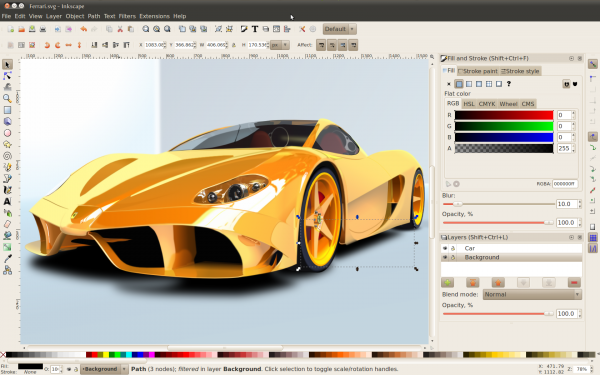
Inkscape has recently released a new version (0.48.1) which will be available for download soon. Some new features in version .48 include:
- An improved text tool which allows you to add subscript, superscript, spacing, rotation and more
- Ability to edit multiple paths
- A spray tool (which is demonstrated in the picture above)
- Takes advantage of multi-threading for the Gaussian Blur filter
The new features in 0.48.1 build upon the already wonderful program. As this program continues to be developed in an open source environment, it will be exciting to see its growth. In addition to GIMP and several other graphic design programs (to be covered soon), Inkscape adds a significant piece of software to open source graphical editing capabilities allowing you to create professional graphics without spending any money on software or licenses.
Inkscape is available for download for Mac OSX, Windows, and Linux. If you do any sort of graphic design or have been wanting to try out working with vector graphics, download it today and you will not be disappointed. If you are new to SVG, there are tons of awesome tutorials and guides available to help you get started.
Thank you for reading! Share your thoughts with me on bluesky, mastodon, or via email.
Check out some more stuff to read down below.
Most popular posts this month
- SQLite DB Migrations with PRAGMA user_version
- My Custom Miniflux CSS Theme
- Convert Markdown to PDF in Sublime Text
- Making cgit Pretty
- Using cgit
Recent Favorite Blog Posts
This is a collection of the last 8 posts that I bookmarked.
- My Running Tips from Kevin Bell's Blog
- tweet from Derek Sivers blog
- Rewrote my blog with Zine from Drew DeVault's blog
- A eulogy for Vim from Drew DeVault's blog
- Pluralistic: AI "journalists" prove that media bosses don't give a shit (11 Mar 2026) from Pluralistic: Daily links from Cory Doctorow
- Offline 23 hours a day from Derek Sivers blog
- Pluralistic: California can stop Larry Ellison from buying Warners (28 Feb 2026) from Pluralistic: Daily links from Cory Doctorow
- On Alliances from Smashing Frames
Articles from blogs I follow around the net
i’m calling it ‘wil wheatcon’ until i can think of something better
In an average year, I travel to around 5 or 6 cities for conventions. Almost every time I announce an appearance, the most common response is some version of “that’s great! When are you coming to [my town]?” I’m not coming to your town, but I am coming to...
via WIL WHEATON dot NET May 20, 2026On people writing about their use of AI
I find the trend of people posting about the way they use generative AI to be fascinating at an anthropological level. I do not remember the last time a piece of technology pushed so many different people into writing about the way they use it, or not use...
via Manuel Moreale — Everything Feed May 20, 2026Exporting Vinted Sold Data
A little javascript snippet to grab Vinted sales data from the website
via Robb Knight • Posts • Atom Feed May 20, 2026Generated by openring